

How it works
From sign-up to your first direct booking.
Set up once, then Rehostly handles the payments, emails and calendar while you look after your guests.
Getting started
Five steps to your first booking.
Create your account
Free, and no card needed.
Set up payouts
Add your bank details through Stripe, our payments partner, so guests can pay you.
Add your place
Your photos, prices and house rules, then pick a design and make it yours.
We review your account
We check every new host before they take payments, usually within one business day.
Go live and share your link
Send it to past guests, add it to your messages and socials, or use your own domain.
When a guest books
You stay in charge. The admin takes care of itself.
Instant or on request
Let guests book straight away, or approve each request first. You have 18 hours to answer.
Deposit now, the rest later
Take a deposit when a booking is confirmed and the balance automatically before arrival, or ask for it all up front.
Guest emails sent for you
Booking confirmations go out automatically. Write your check-in details and thank-you note once, and they're sent at the right time for every stay.
Your calendar in step
Airbnb and VRBO calendars are synced every 20 minutes, so a night booked there is closed here.
Getting paid
Money in your account, in Canadian dollars.
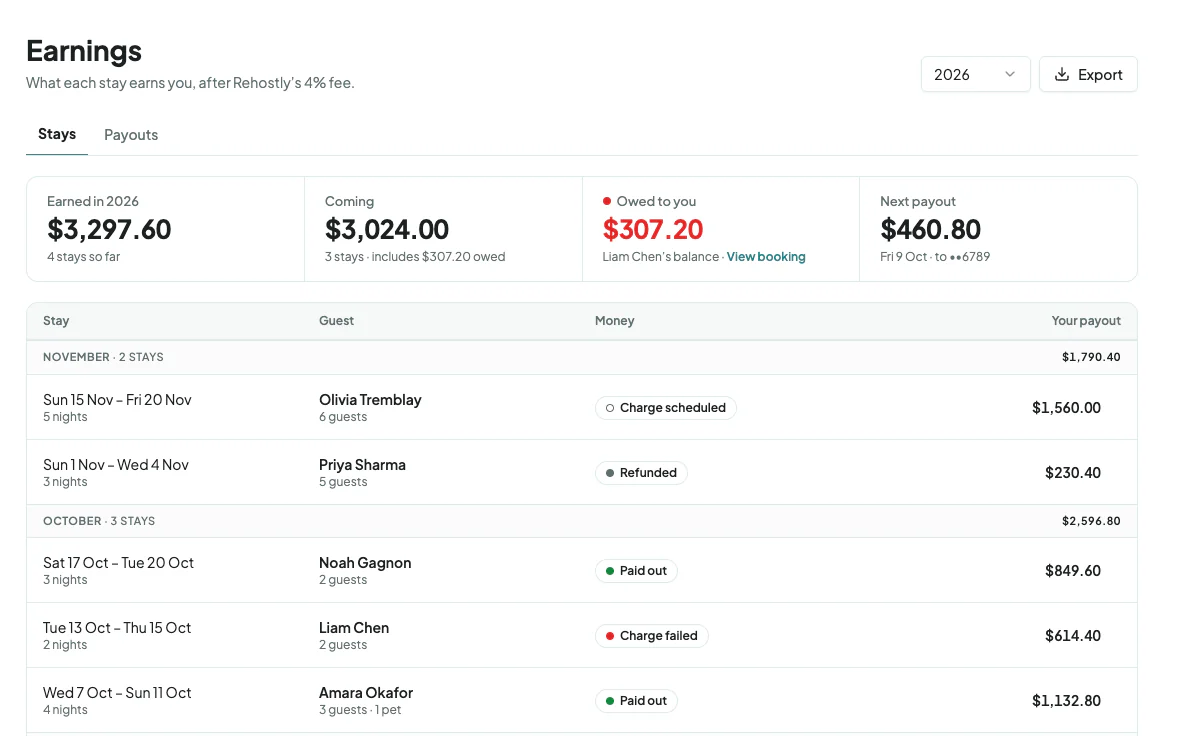
Your share of each payment goes to your Stripe account as it clears, and Stripe pays it into your bank. You see every stay and payout under Earnings.
Start your site today.
Free to use. We only earn when you're booked.